What Are the Deposit Methods for EdgeGraph FX? A List of Deposit Methods and How to Use Them, Explained Clearly!
This article provides a clear explanation of EdgeGraph FX's deposit methods, from how to use them to important points to be aware of.
The deposit methods currently supported by EdgeGraph FX are 4 types: "Bank Transfer", "Cryptocurrency", "STICPAY", and "PAY WAVE".
Let's take a look at the available deposit methods for EdgeGraph FX and related deposit information.
Summary and Key Points of This Article
- EdgeGraph FX offers 4 deposit methods: "Bank Transfer", "STICPAY", "Cryptocurrency", and "PAYWAVE"
- A fee applies for deposits of 50,000 yen or less
- Cryptocurrency deposits are fee-exempt
- The deposit account must be in the same name as the EdgeGraph FX account
Table of Contents
- List of EdgeGraph FX Deposit Methods
- Bank Transfer Deposit Method [EdgeGraph FX Limited]
- Cryptocurrency Transfer Deposit Method [EdgeGraph FX Limited]
- STICPAY Deposit Method [EdgeGraph FX Limited]
- PAY WAVE Deposit Method [EdgeGraph FX Limited]
- Notes and Rules Regarding EdgeGraph FX Deposit Methods
- EdgeGraph FX Deposit Methods Summary
List of EdgeGraph FX Deposit Methods
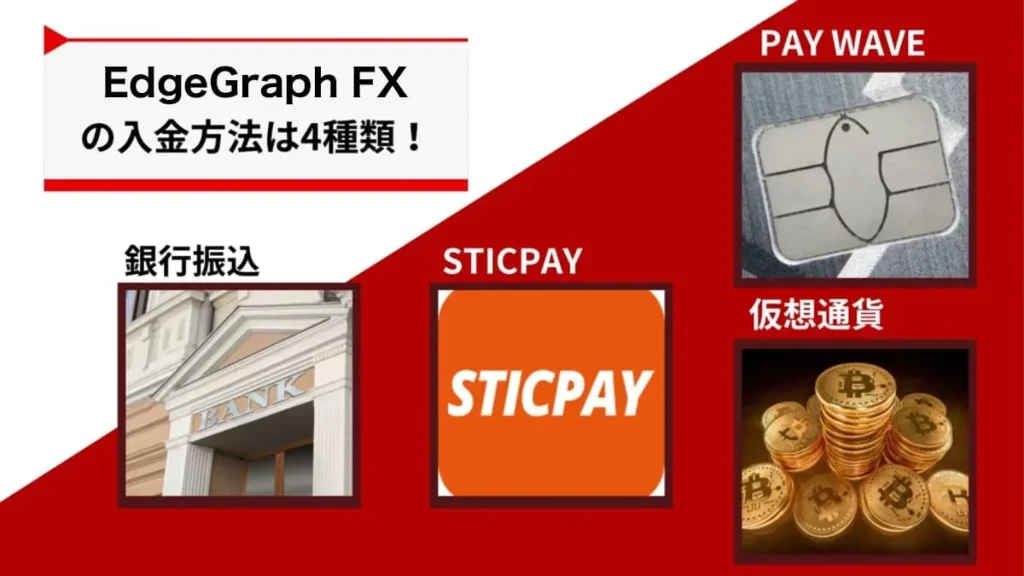
EdgeGraph FX supports the following 4 deposit methods.
- Bank Transfer
- Cryptocurrency
- STICPAY
- PAY WAVE
While it may seem limited at first glance, you can choose from a wide variety of deposit methods, including not only domestic bank transfers but also cryptocurrency deposits and credit card deposits via PAYWAVE.
Please refer to the table below for details on EdgeGraph FX's 4 deposit methods.
Deposit Method Comparison
| Deposit Method | Deposit Reflection Time | Deposit Fee | Reliability |
|---|---|---|---|
| Bank Transfer | 1–2 hours | 1,000 yen (for deposits under 50,000 yen) | High |
| Cryptocurrency | Immediately after processing | None | High |
| STICPAY | Immediately after processing | None | High |
| PAY WAVE | Immediately after processing | Yes | High |
For those using EdgeGraph FX for the first time, bank transfer is the most straightforward and recommended option.
Those who want to use faster deposit processing should use cryptocurrency deposits, PAYWAVE, or STICPAY.
Please note that account registration is required to use PAYWAVE and STICPAY deposits, so make sure to complete account registration before using them.
- PAYWAVE:https://paywave.world/
- STICPAY:https://www.sticpay.com/ja-JP
The recently added PAYWAVE is highly recommended as a deposit method because it offers fast fund arrival and also supports withdrawals.
For those who want to know how to open an account with EdgeGraph FX, please refer to this guide.
Bank Transfer Deposit Method [EdgeGraph FX Limited]
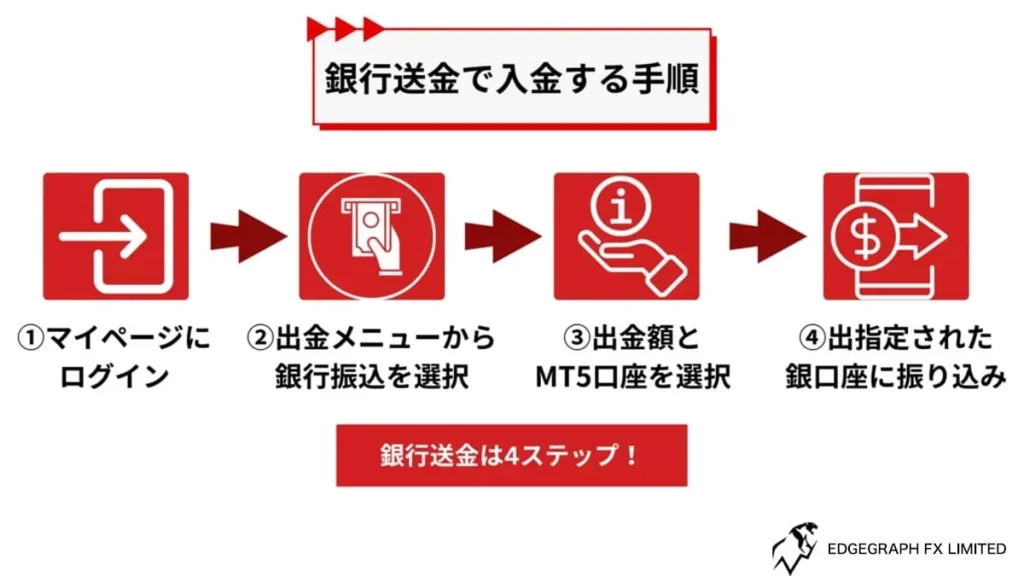
Here we will explain how to make a deposit via bank transfer.
Bank transfers are generally reflected within approximately 1 to 2 hours.
Log in to My Page
First, please log in to My Page.
Once logged in to My Page, you will find a "Make a Deposit" option. Click it to proceed to the next step.
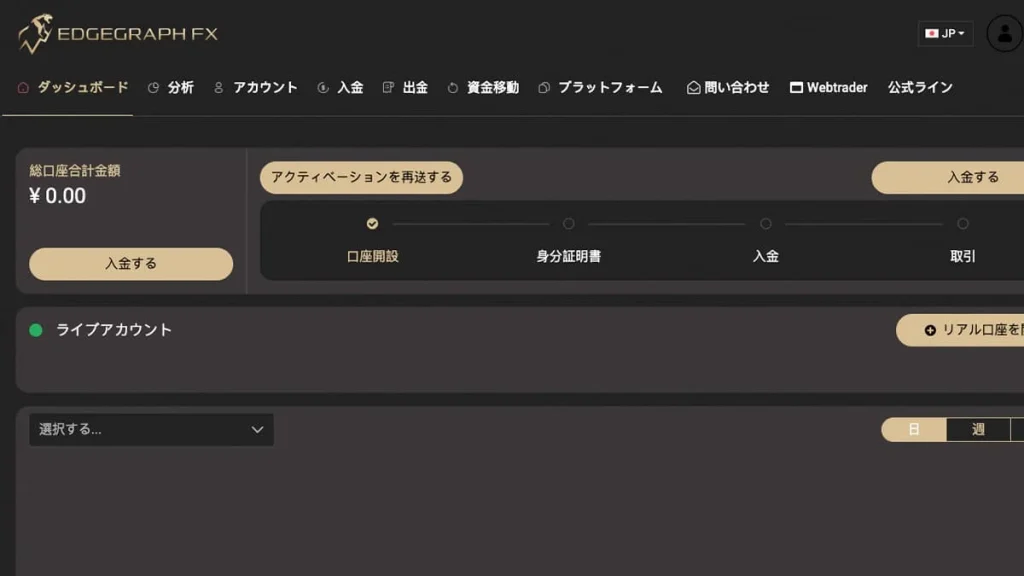
Select Bank Transfer
Next, select your deposit method.
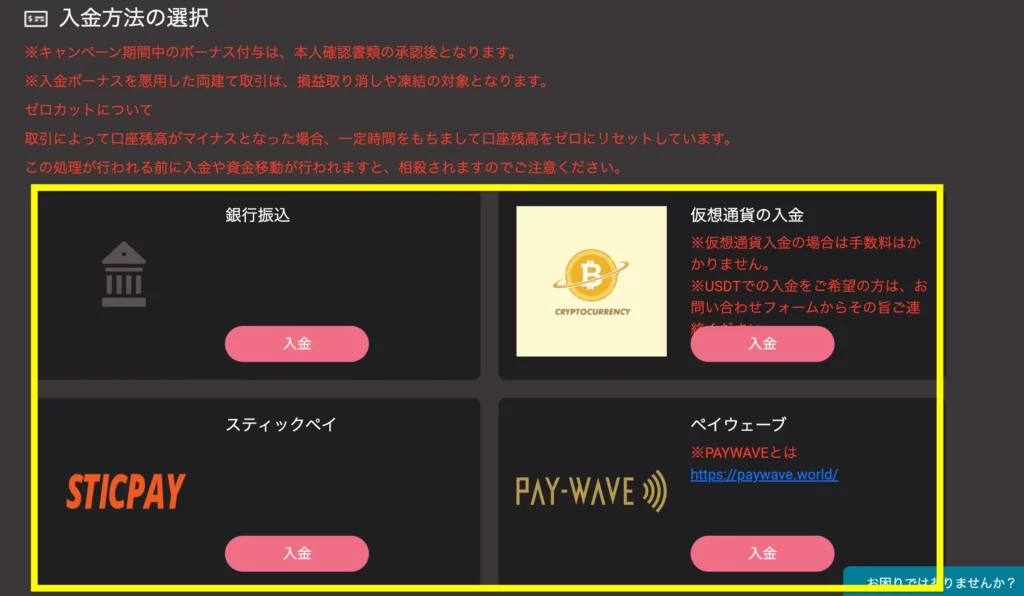
Since we are using bank transfer this time, please click the deposit button under "Bank Transfer".
Enter MT5 Account Number and Deposit Amount
Next, enter your MT5 account number and deposit amount.
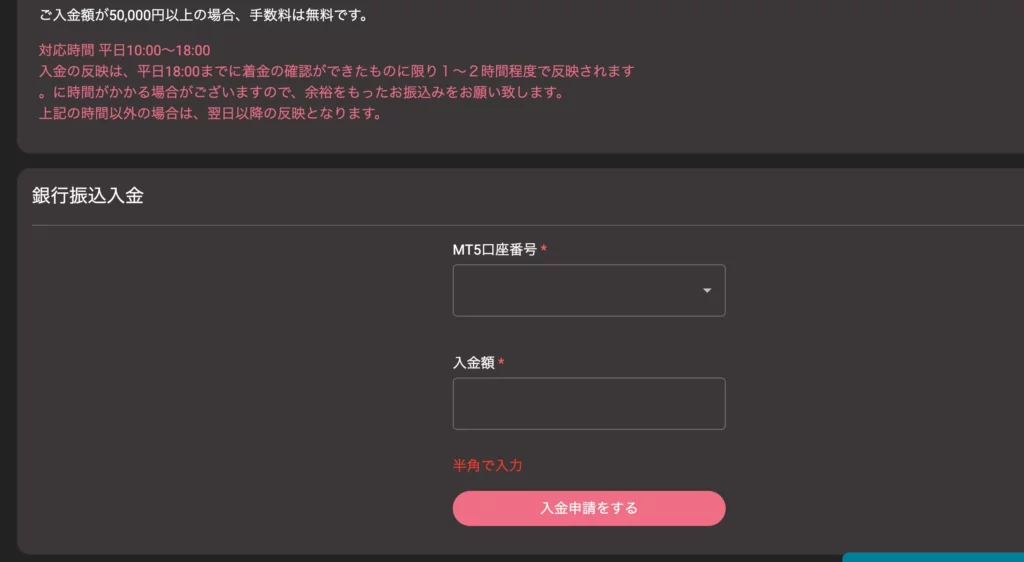
Clicking on the MT5 account number field will display a list of account numbers you hold. Select the account number you wish to deposit into.
Enter the amount you wish to deposit.
Finally, click "Submit Deposit Request" to confirm the deposit amount.
Deposit to the Specified Account
Once the deposit request is confirmed, the destination bank account will be displayed.
Please transfer the funds from your own financial institution to the specified destination account.
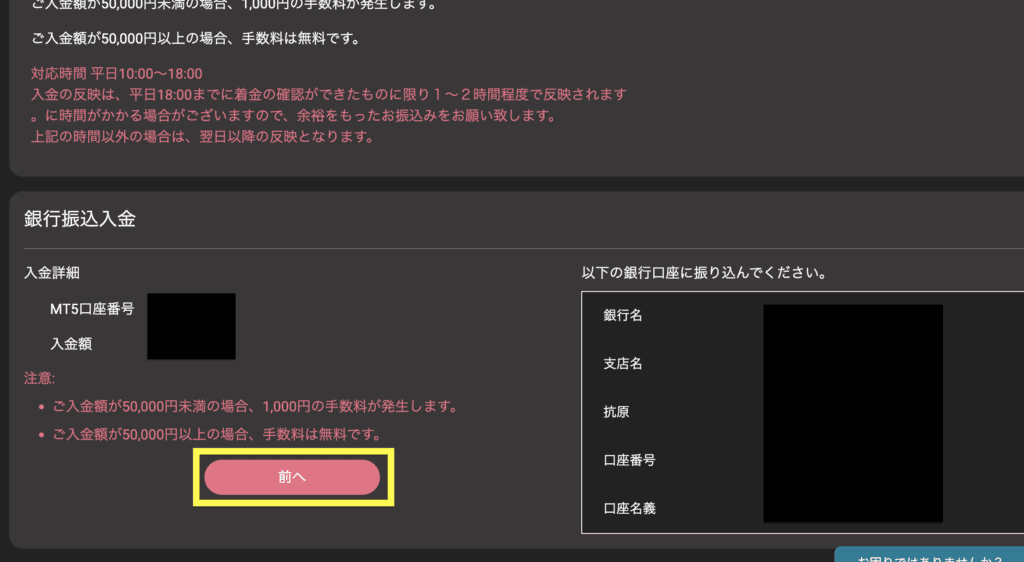
After the transfer, the deposit amount will be reflected in your MT5 account within approximately 1 to 2 hours.
Cryptocurrency Transfer Deposit Method [EdgeGraph FX Limited]
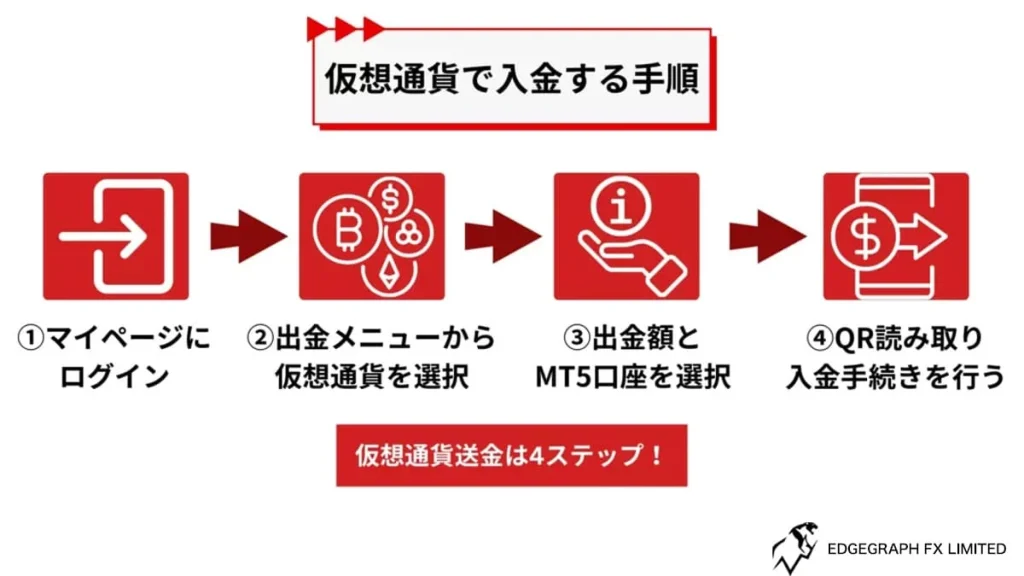
Next, we will explain how to make a deposit via cryptocurrency transfer.
EdgeGraph FX supports cryptocurrency, but through the "Cryptocurrency Deposit" option, only BTC (Bitcoin) can be selected.
Therefore, if you wish to deposit using USDT or other cryptocurrencies, please contact EdgeGraph FX to request a transfer addressor alternatively,select PAYWAVE deposit to complete your deposit.
Please understand that the procedure introduced here is the general method for depositing with Bitcoin before proceeding.
Log in to My Page
Log in to My Page in the same way as for bank transfer.
Then click "Make a Deposit" to navigate to the deposit screen.
Select Cryptocurrency
On the deposit screen, select "Cryptocurrency Deposit" on the right side.
If you wish to deposit using USDT, select PAYWAVE deposit, or contact us in advance via the inquiry form to obtain a transfer address.
For Bitcoin, simply click the deposit button and proceed.
Enter MT5 Account Number and Deposit Amount
Enter your MT5 account number and the Bitcoin amount.
Enter the MT5 account number just as you would for bank transfer, using the one notified to you by email.
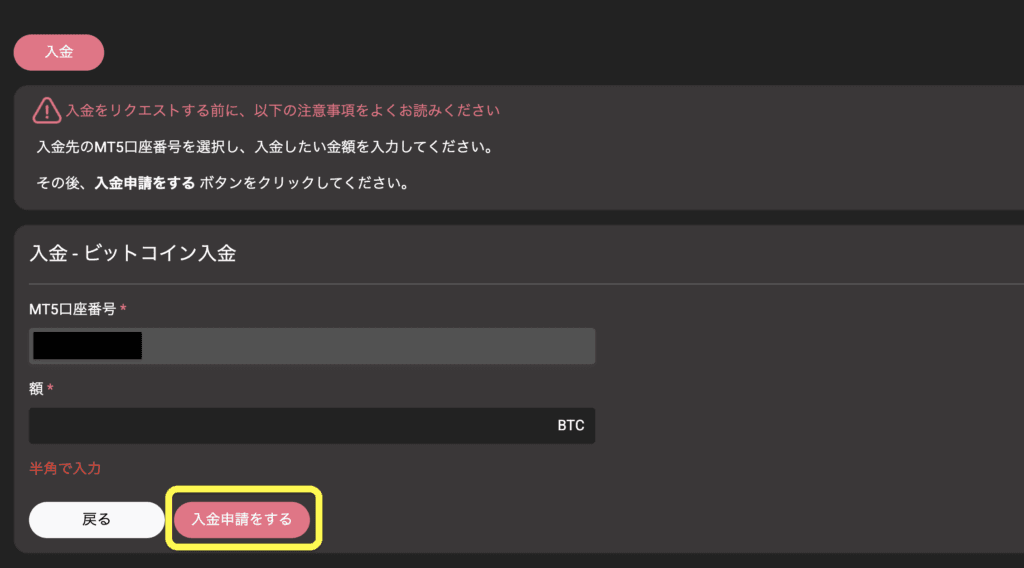
Once entered, the account number is fixed, so you will not need to re-enter it when selecting other methods.
Please note that the Bitcoin amount is in BTC units, and be careful not to enter an excessively large amount.
Scan the QR Code and Complete the Deposit Process
Clicking "Submit Deposit Request" will display a QR code.
This QR code is required for the Bitcoin deposit, so please scan it and proceed.
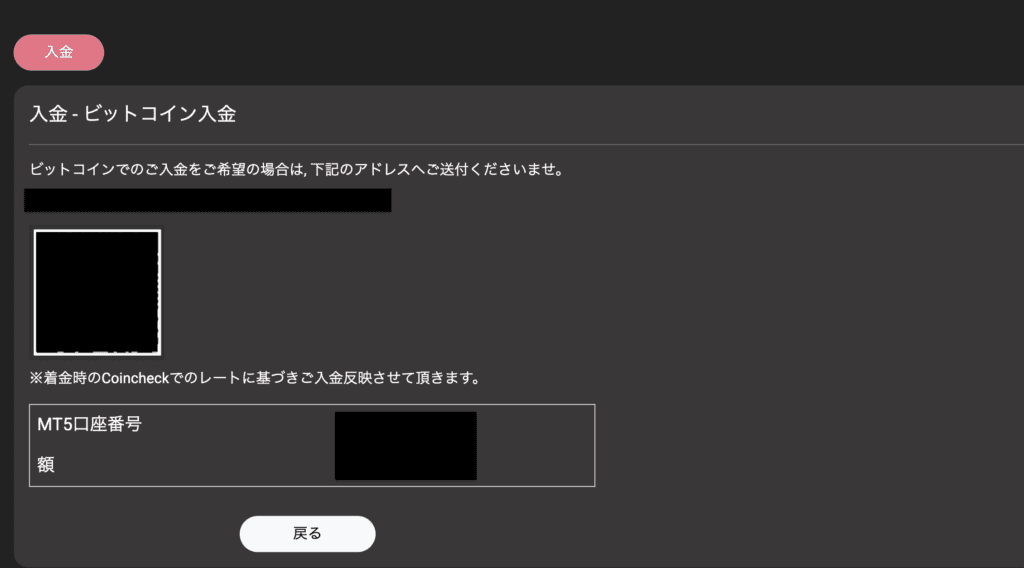
After that, go to the cryptocurrency exchange and send Bitcoin to the specified deposit address.
Once confirmation is complete, EdgeGraph FX will process and reflect the deposit.
Experience unrestricted trading with maximum leverage of 1000x and industry-lowest level spreads!
Open an EdgeGraph FX Account HereSTICPAY Deposit Method [EdgeGraph FX Limited]
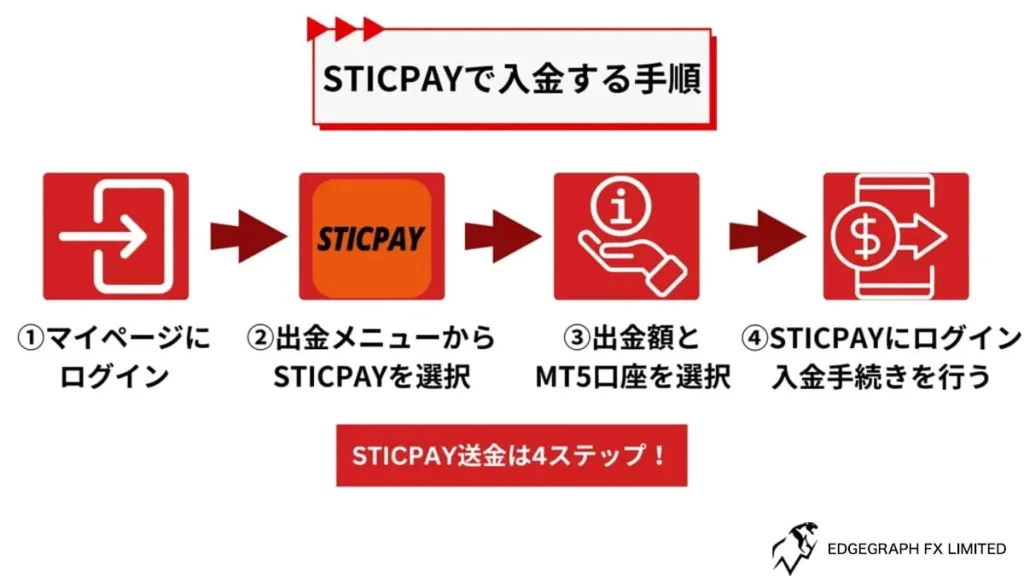
EdgeGraph FX also supports deposits via STICPAY.
STICPAY is a well-known electronic payment service in the overseas FX industry and can be used not only with EdgeGraph FX but also with various other financial services.
Since STICPAY requires an account to make a deposit, please create an account in advance and complete the deposit procedure.
Log in to My Page
Just like the other methods, please log in to My Page.
Then click "Make a Deposit" to proceed to the next screen.
Select STICPAY
Under the deposit method, select "STICPAY".
Clicking the option in the lower left will take you to the next screen.
Enter MT5 Account Number and Deposit Amount
Please enter your MT5 account number and the amount.
If you have already completed a deposit process using another method, the MT5 account number may already be pre-filled, saving you the trouble of entering it again.
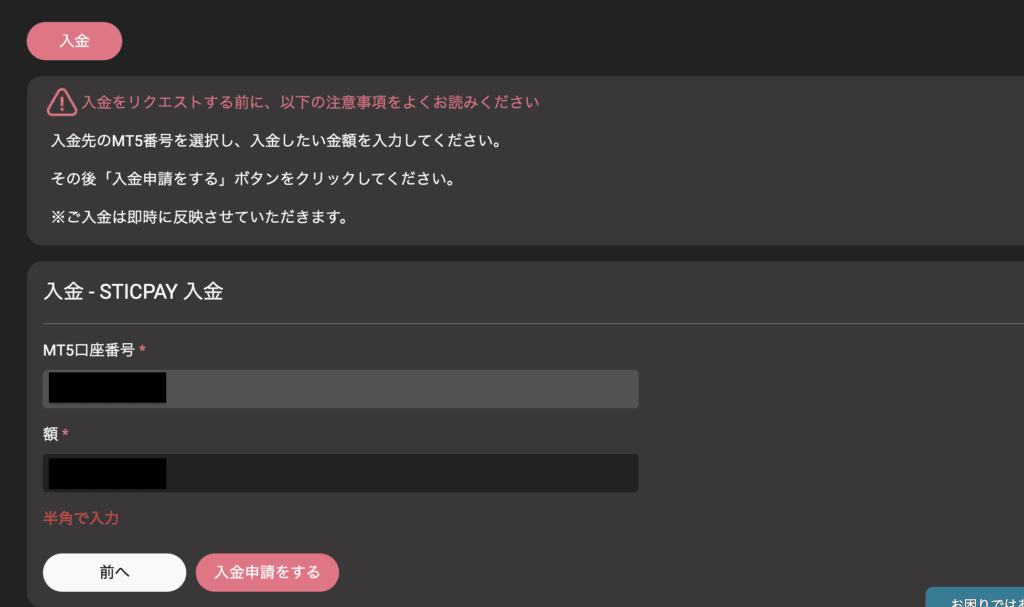
The amount will be entered in yen, so please enter the deposit amount even though the unit may not be displayed.
Once all fields are filled in, click "Submit Deposit Request".
Log in to STICPAY and Complete the Process
Clicking "Submit Deposit Request" will redirect you to STICPAY.
Log in at the redirected page and complete the STICPAY deposit process.
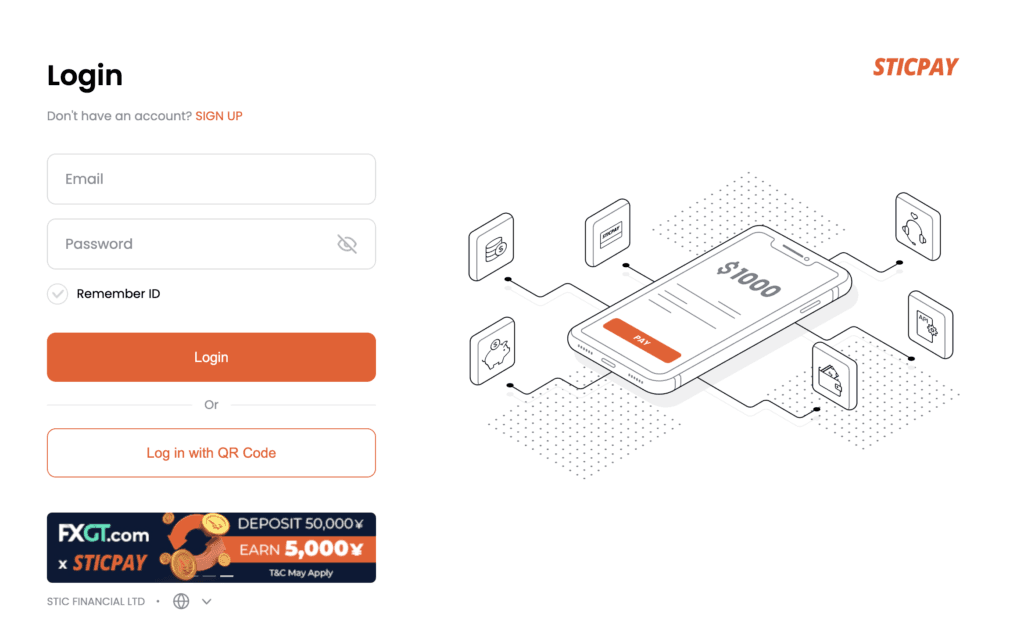
Once the deposit process is complete, you will be redirected from STICPAY back to EdgeGraph FX.
The deposit process is completed simultaneously upon redirection, so unlike other methods, you can start trading immediately without waiting.
PAY WAVE Deposit Method [EdgeGraph FX Limited]
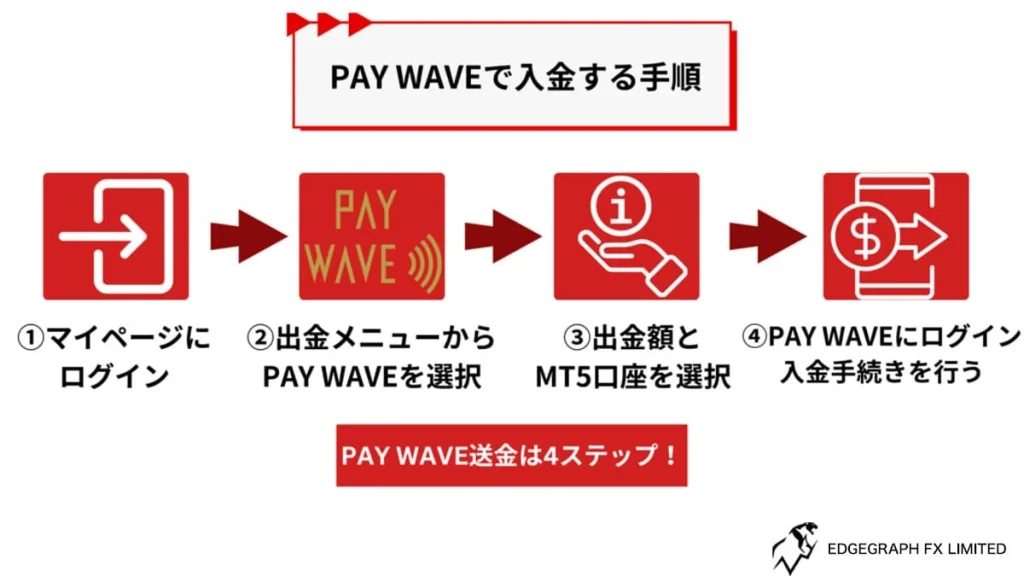
We will similarly explain the PAY WAVE deposit method.
Log in to My Page and select PAY WAVE from the withdrawal section.
Enter MT5 Account Number and Deposit Amount
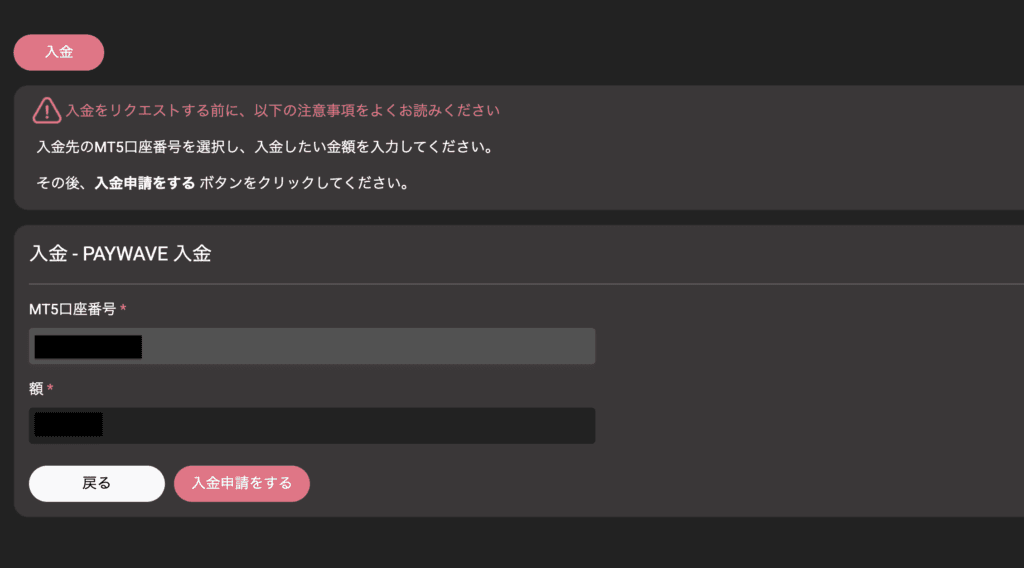
Select the amount and MT5 account number in the same way as previous methods.
Log in to PAY WAVE and Complete the Process
Pressing the "Submit Deposit Request" button will take you to the PAY WAVE payment page.
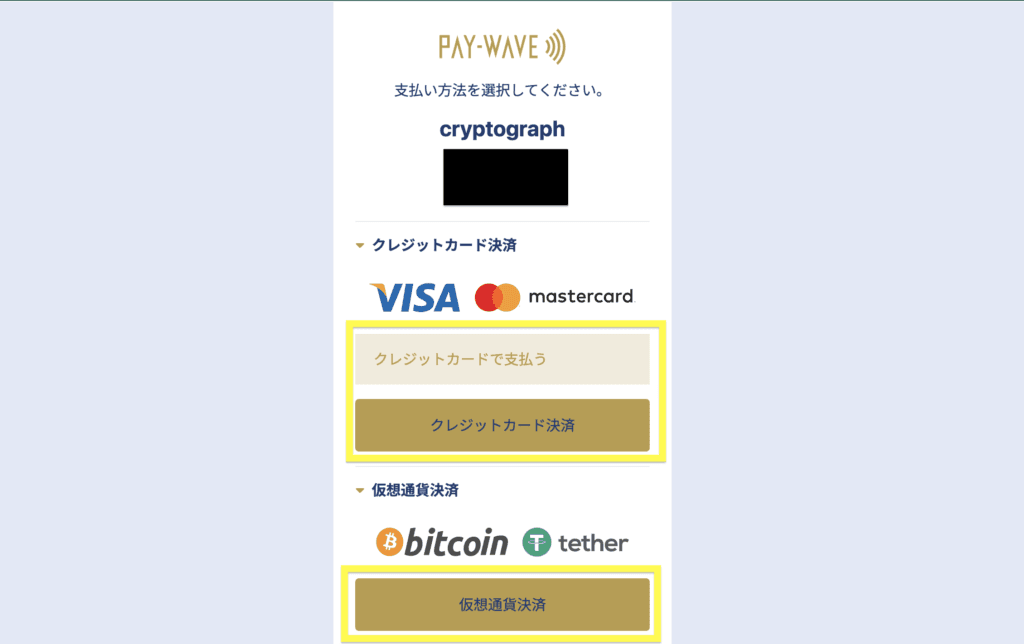
You can choose from two types of payment: credit card payment and cryptocurrency payment.
While logged in, select your preferred method and complete the payment. After the process is complete, the deposit will be reflected in your MT5 account immediately.
As you can see, EdgeGraph FX offers a variety of deposit methods. Electronic payment services in particular are recommended for their fast reflection speed.
Experience unrestricted trading with maximum leverage of 1000x and industry-lowest level spreads!
Open an EdgeGraph FX Account HereNotes and Rules Regarding EdgeGraph FX Deposit Methods
There are certain points to be aware of regarding deposit methods at EdgeGraph FX.
A fee applies for deposits of 50,000 yen or less
Cryptocurrency deposits are fee-exempt
The deposit account must be in the same name as the EdgeGraph FX account
Since bank transfers incur a fee, measures such as increasing the deposit amount are required to reduce fees.
Also, please note that if the name on the destination account does not match the transfer name, the deposit cannot be processed.
Here we will explain in detail the points to be aware of when making deposits at EdgeGraph FX.
If the Deposit Amount is 50,000 Yen or Less, a Fee Applies
When using bank transfer, a fee is charged if the deposit amount is 50,000 yen or less.
Deposit Method Comparison
| 50,000 yen or less | 1,000 yen fee |
| Over 50,000 yen | No fee |
Please note that depositing 50,000 yen or less will result in a 1,000 yen fee being deducted.
If you are concerned about fees, consider choosing STICPAY or cryptocurrency transfer.
If you choose to use bank transfer, we recommend depositing 50,000 yen or more to avoid fees.
For Cryptocurrency Deposits, the Fee is Free
The fees mentioned earlier apply only to bank transfers.
If you use a method other than bank transfer, there are no fees.
Deposit Method Comparison
| Bank Transfer | Fee is charged |
| Cryptocurrency | No fee charged |
| STICPAY | No fee charged |
Cryptocurrency and STICPAY, which have no fees, are advantageous deposit methods. If you are considering depositing only a small amount, it is advisable to avoid bank transfer.
However, cryptocurrency requires purchasing Bitcoin in advance, and STICPAY requires account creation and a deposit procedure, which takes some effort.
If you prefer to avoid the hassle, selecting bank transfer and sending to a domestic bank is the easiest approach.
If you are able to prepare properly, make use of cryptocurrency, STICPAY, or PAY WAVE, which do not incur fees from EdgeGraph FX.
Deposits Must Be Made Under the Same Name as the EdgeGraph FX Account
The most important thing to keep in mind when making a deposit is that the name on the EdgeGraph FX account and the name on the deposit account must be the same.
If the name on the deposit does not match, it becomes unclear who made the deposit, and EdgeGraph FX will be unable to verify it and will halt the deposit process.
Especially during bank transfers, there is a possibility that the account may be held under someone else's name, so when making a deposit, ensure the name matches that of the EdgeGraph FX account.
Deposit Method Comparison
| Bank Transfer | Transfers from an account in another person's name will not be reflected |
| STICPAY | Deposit will be processed as long as the login information is correct |
However, for cryptocurrency, since the deposit is made to a transfer address, there is no verification of the transfer name against the account holder's name. Transfers from any wallet are possible.
- With STICPAY, identity verification cannot be completed if the wrong account is used
- Cryptocurrency exchanges require identity verification, making it impossible to register under an incorrect name
- The risk of paying EdgeGraph FX under a different name applies to bank transfer
You may conclude that bank transfer is the only method where there is a risk of making a deposit error under the same-name rule, but please be careful not to use another person's account with other methods either.
In particular, be careful not to send money using an account held by a friend or family member just because it is not your own account.
EdgeGraph FX Deposit Methods Summary
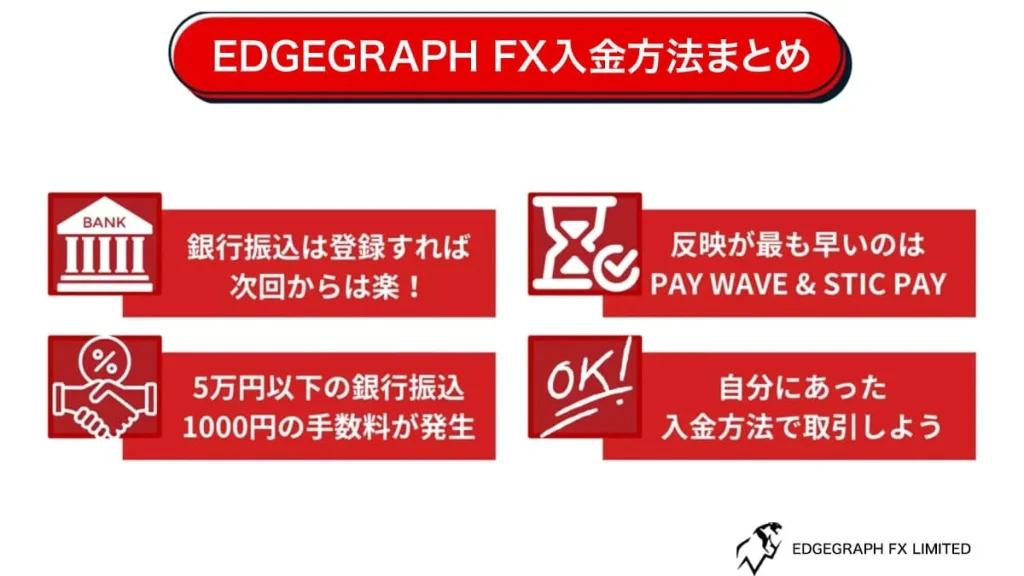
EdgeGraph FX offers a total of 4 deposit methods, providing users with the freedom to choose their preferred deposit method.
Furthermore, since the deposit methods include easy-to-use options such as domestic bank transfers, the situation of having difficulty making a deposit will not arise.
Bank transfer is basically the easiest to use, but considering the fee burden, cryptocurrency and STICPAY are also convenient options.
Consider which method suits you best, and then decide on the most convenient deposit method for you.
Summary and Key Points of This Article
- EdgeGraph FX offers 4 deposit methods: "Bank Transfer", "STICPAY", "Cryptocurrency", and "PAYWAVE"
- A fee applies for deposits of 50,000 yen or less
- Cryptocurrency deposits are fee-exempt
- The deposit account must be in the same name as the EdgeGraph FX account

![What is an FX Bonus? A Complete Guide to the Difference from Balance [EdgeGraph FX Beginner's Guide]](/_next/image?url=https%3A%2F%2Fhezwttxy7pl7mw4j.public.blob.vercel-storage.com%2F13-2-2.webp&w=3840&q=75)
![How to Start MT5 Trading with an EdgeGraph FX Demo Account [Complete Guide to Getting Started and Key Points]](/_next/image?url=https%3A%2F%2Fhezwttxy7pl7mw4j.public.blob.vercel-storage.com%2F12-2-2.webp&w=3840&q=75)
![What are EdgeGraph FX Spreads? A Complete Introduction to Spreads by Account Type [EdgeGraph FX LIMITED Official]](/_next/image?url=https%3A%2F%2Fhezwttxy7pl7mw4j.public.blob.vercel-storage.com%2F8-2.webp&w=3840&q=75)
![A Thorough Comparison of EdgeGraph FX's 3 Account Types, Their Differences, and Recommended Points [EdgeGraph FX LIMITED Official]](/_next/image?url=https%3A%2F%2Fhezwttxy7pl7mw4j.public.blob.vercel-storage.com%2F7-2.webp&w=3840&q=75)